
I am relatively new to data science. I always kept wondering what is data science. I came across another blog post that talks about one of the Python Libraries. Its called PyCaret.
So this is what I did:
To install PyCaret. I Downloaded and got the anaconda’s for Python installed on my system.
You too can follow along :).
Once it’s done open up Anaconda Powershell Prompt and type in the below command to get PyCaret deployed in your system.
conda create –name myfirstproj python=3.6
then activate your environment and install PyCaret.
conda activate myfirstproj
pip install PyCaret
I am using Power BI to implement and run machine learning models using the inbuilt python integrator in Power BI.
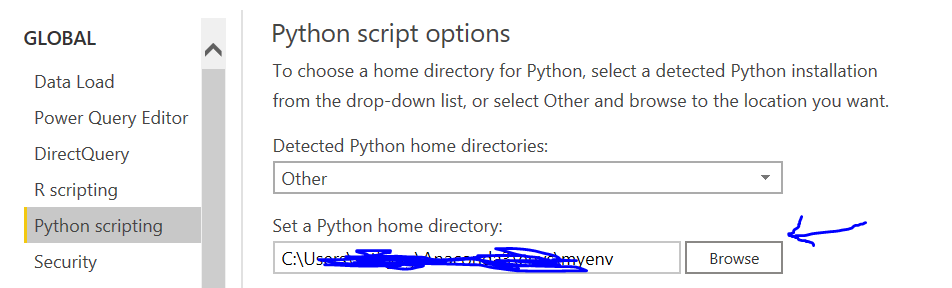
-> Navigate to your Power BI Options and then to the Python scripting.
-> Place in your myfirstnewproj environment which was created. Can be found under anaconda’s in the directory it was first installed.
Learning – Clustering (Machine Learning Concept using Power BI)
That which groups data points with similar characteristics. Useful for exploring and finding patterns in data.
Let’s now bring in some data from the web. We will connect to a github repo for this.
Use the Power BI connector for Web. Load the dataset into Power BI.
Go to Transform data (Power Query) in Power BI and click on Transform tab and select ‘Run Python Script’.
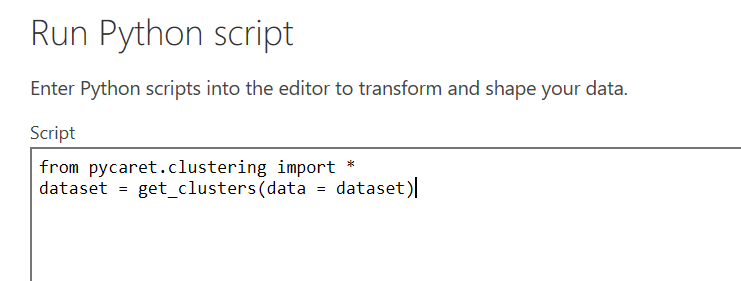
A new column cluster will be created now.
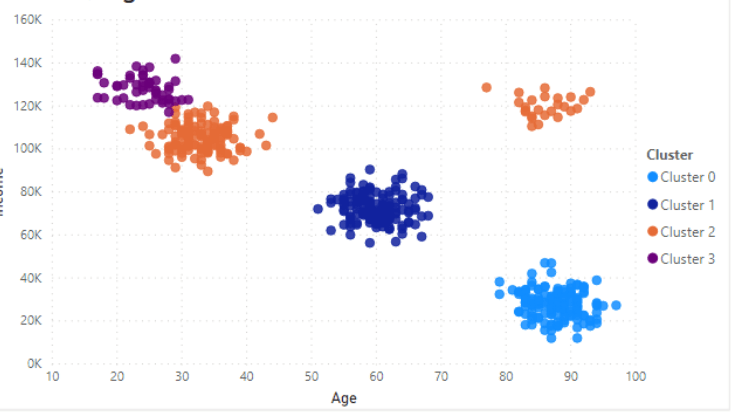
By Default PyCaret will create k-clusters of 4. This can be modified. You will be able to group your data with basic characteristics that will look something like the below.
 Learn Business Intelligence