
A new function was released quite recently on the Power BI. I personally believe this is very useful in terms of identifying the blanks() in row values and doing something about. Let us try understanding what it does first. Go ahead and create the table as shown below.
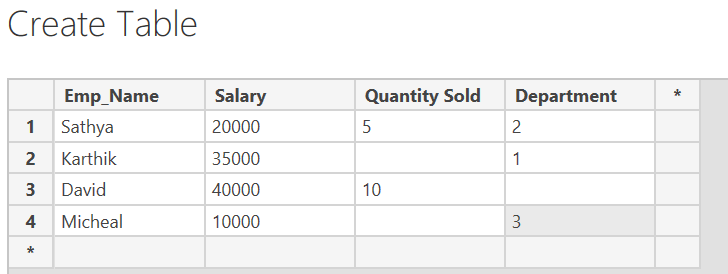
Now lets try identifying and doing something about those blank values in the table.
Create a new measure with the coalesce function.

Case 1:
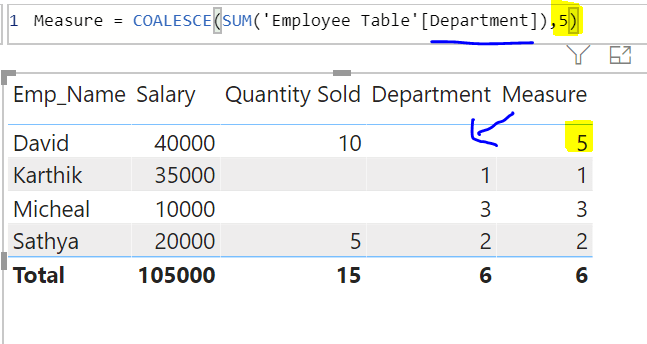
Fill the blanks with a default value.
As you can see the department value for David Employee is empty. Now, if we do know David’s Department number. This can be placed out with the below function as shown.
Case 2:
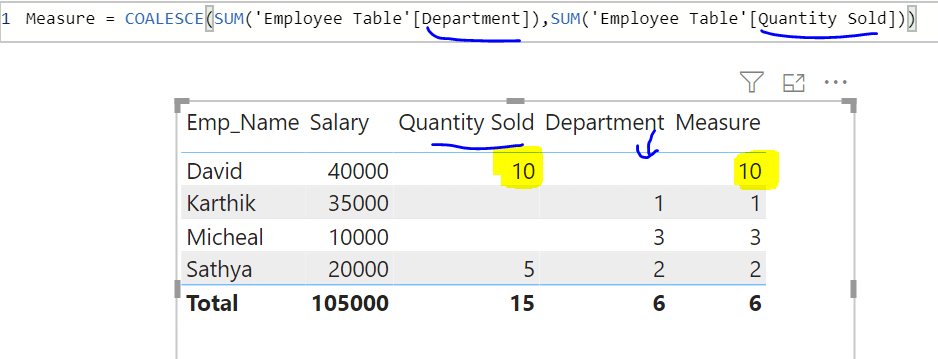
Fill the blank spot with another measure.
Case 3:
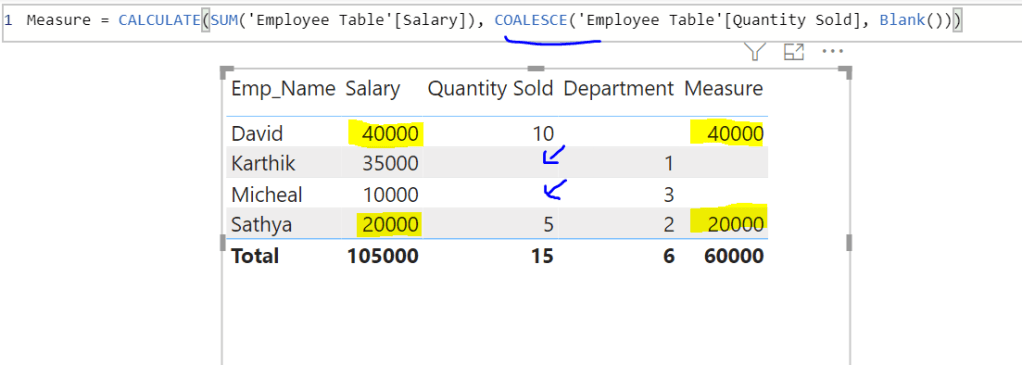
Evaluate row values whether if blank or if not and place a value using CALCULATE function.
CALCULATE syntax is: CALCULATE ( EXPRESSION, [FILTER] )
COALESCE will act as the filter condition to evaluate the paramter.
There are so many more use cases. Do find them out and share it out.!
 Learn Business Intelligence